PAGE 01
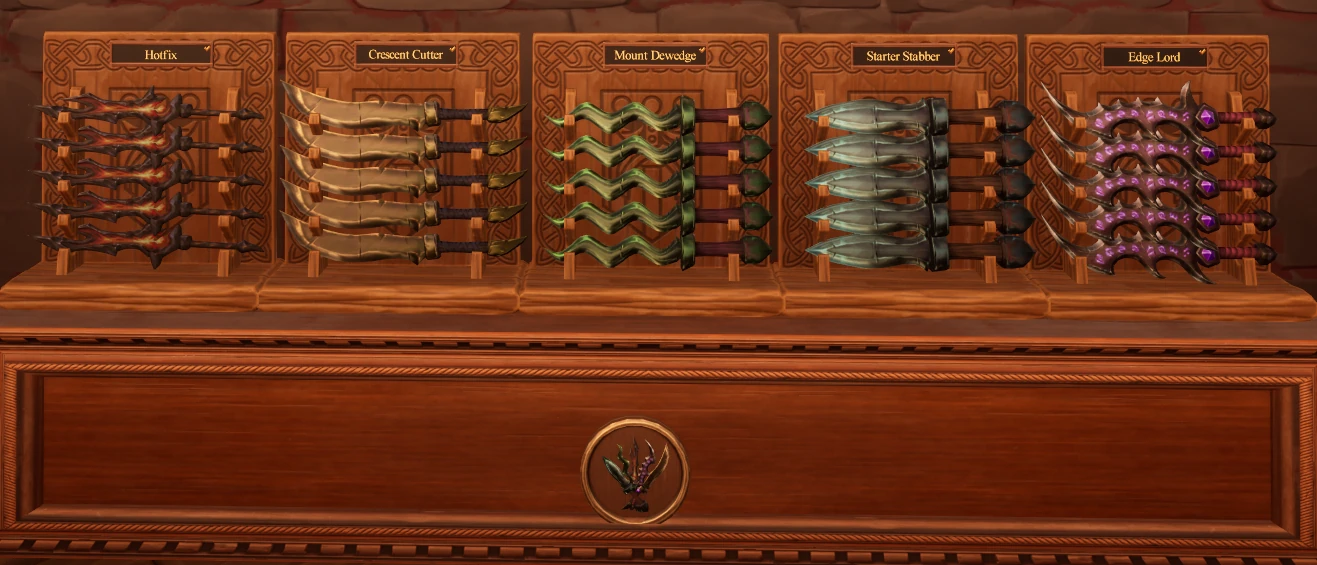
Compare the five daggers
Read the item label before using the weapon silhouette. Similar blade lengths and colors can belong to different named collections, so the rack emblem narrows the category while the placard supplies the final match.
Work one dagger name at a time. Place a confirmed copy, use the occupied position as the anchor for the next copy, and stop when the shelf label shows completion.
| Collection | Distinctive appearance in the example |
|---|---|
| Hotfix | Red and black curved blades |
| Crescent Cutter | Pale curved blades |
| Mount Dewedge | Green wavy blades |
| Starter Stabber | Straight blue-gray blades |
| Edge Lord | Purple blades with glowing details |
PAGE 02
Move to axes only in the appropriate shop
Axes are listed in Grand Athenaeum, not Hearth & Barrel or Merchant’s Rest. Briar Axe and Greyedge are two examples.

PAGE 03
Finish the object you are holding
Do not carry a weapon into a food, toy or treasure route just because the displays are nearby. Confirm the held-item name, finish its matching rack, then start a new category batch.
If no obvious rack accepts it, hover the placards in the weapon area and use Arcane Sight while holding the item. Move to Recover Lost Items only when the object itself is stuck or missing; recovery does not identify the destination for you.
PAGE 04
Give food and large finds a destination
“Treasures” here means other display finds; it is not a claimed category label. Keep food and large objects separate from the weapon rack task.
Kakarotto is the carrot in the Vegetable group. Compare the item name with its placard before placing another copy.
For a large first target, use the Voidscale Egg and its egg display in Hearth & Barrel. The linked route shows its one-item collection. Move an obstructing large find to its matching display before searching the newly exposed floor; that order is a recommendation, not a tested speed bonus.