PAGE 01
Compare the complete shop totals
These are objects to shelve, including repeated copies, rather than counts of unique item names.
Use the count as a workload signal, not a promise about run time. Hearth & Barrel is the best place to learn placards and collection completion; Merchant’s Rest adds enough distance to reward batching; Grand Athenaeum makes sector-by-sector cleanup and recovery tools more important.
Before starting, write down the shop, mode and displayed denominator. If a patch changes the number shown in your client, the live denominator wins for completion tracking while the older count remains a dated reference.
| Shop | Town | Objects |
|---|---|---|
| Hearth & Barrel | Burg | 1,048 |
| Merchant’s Rest | Stonebridge | 3,085 |
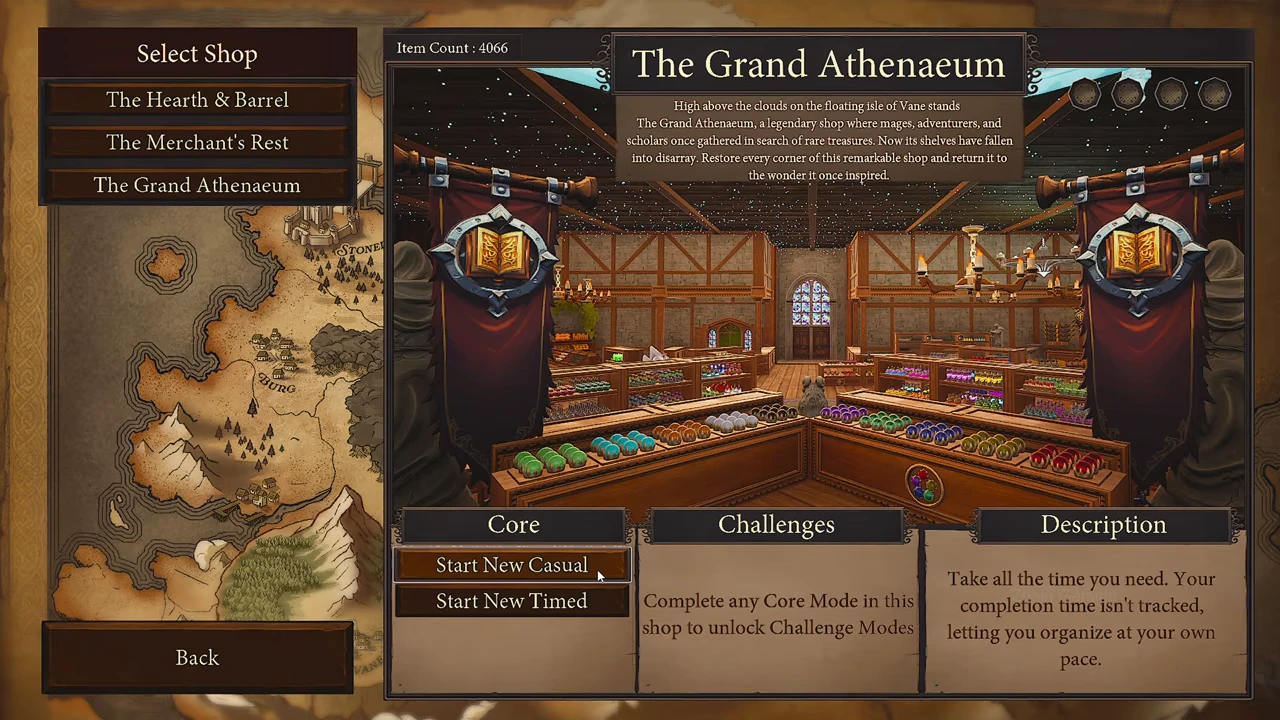
| Grand Athenaeum | Vane | 4,066 |
PAGE 02
Choose the kind of run
Choose Casual for untimed sorting, Timed for a recorded finish, or Archmage to begin with all Sorceries and Enchantments unlocked.
If you are playing the demo, only Hearth & Barrel in Casual is included.
For a first clear, choose Casual and learn one category at a time. Use Timed only after you can identify shelves without repeated full-room searches. Archmage changes the available tools, while No Magic removes Sorceries; those modes should not be compared as if they were the same route.
PAGE 03
Use each shop’s own controls
Select a shop in the left column to reveal its Core buttons. Start New Casual and Start New Timed appear on the selected shop; an existing Casual save instead also offers Resume Casual. Challenge Modes require completion of any Core Mode in that same shop.
The August 12 menu shows 3,088 objects for Merchant’s Rest; the later shop listing reports 3,085. Use the denominator displayed by your installed version when checking completion.
Protect an existing save when changing modes. If the confirmation warns that the same map and mode will be replaced, choose No unless you intentionally want a fresh run.